A UK clinical homecare and specialist pharmacy provider was receiving hundreds of prescriptions a day by post and email, each one printed, sorted and scanned by a person before a pharmacist could act. We replaced that with an AI-driven intake pipeline on Microsoft Azure, now live and handling real patient prescriptions every day.
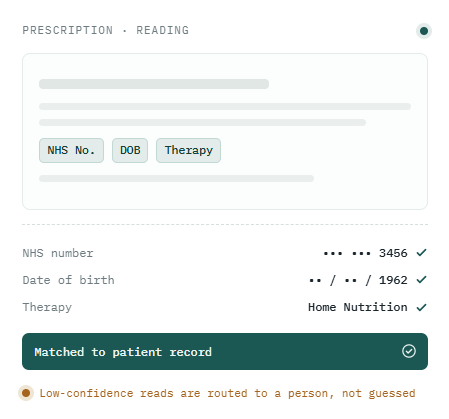
OCR extracts the fields that identify the patient. Values are masked here — in production every document is encrypted and access-controlled.
Minutes
from upload to the pharmacy queue — down from up to two days by post
700+ / day
prescriptions flowing through a single fulfilment site
Zero
manual print, sort and scan steps for a matched prescription
The challenge
A fast clinical service, held up by paper
Posted prescriptions took around two days to arrive, then another couple of hours to be printed, sorted and scanned into the document management system through the patient record in Microsoft Dynamics 365 Business Central. Emailed prescriptions still had to be handled by hand. At one fulfilment site alone that meant roughly 700 prescriptions a day moving through a manual queue — slow for clinicians, heavy on staff time, and open to duplicate handling.
The brief was simple to state and hard to deliver: cut the time from submission to action from days to minutes, without losing accuracy or control over patient data.
What we built
An intake pipeline that reads, matches and files
Clinicians upload one prescription or a whole batch through a single gateway, and the system takes it from there. It splits bundled and multi-page documents into individual prescriptions, reads the fields that identify the patient, and matches each one to the correct record — checking NHS or CHI number, date of birth and therapy, with fallback sequences for when the primary identifier isn't clean.
On a confident match it files the prescription image and its index data into the document management system, writes the record back into Business Central, and clears the medication reminders that would otherwise keep chasing a prescription that has already arrived. Anything it can't match with confidence is routed straight to the operations team to resolve. Nothing is guessed, and nothing is silently dropped.
How it works
Built on Microsoft Azure
Upload
single or batch
Split
Azure Doc Intelligence
Read
OCR field extraction
Match
Business Central
File
Therefore DMS
Review
low-confidence matches go to a person
Azure Document Intelligence handles document classification and splitting, using confidence scores to decide where one prescription ends and the next begins. Field-level OCR extracts the data, and a matching engine resolves each prescription against the patient records in Business Central before writing documents and index data into the Therefore document management system through its APIs. Encrypted Azure Blob Storage holds every document, logs every step for audit, and feeds an automated daily report to the operations team.
Built for trust
Secure by default, accountable by design
Working with patient data means the controls aren't an afterthought. Documents are encrypted at rest, every matching attempt is logged with its confidence scores for full traceability, and a human stays in the loop wherever the system isn't sure — uncertain matches are handed to people rather than forced through.
The platform was handed over with the monitoring, reporting and documentation the client's own teams need to run it day to day, so the capability stays with them.
Live in production
Secure, production-grade AI for regulated environments.